Posts

Regular expressions tricks and tips

Regex: Literal characters:  Alphanumeric character: itself \o: null character \t: tab \n: newline \v: vertical tab \f: form feed \r: carriage return \x nn: Latin character specified by a hexadecimal number \u xxxx: Unicode character specified by the hexadecimal number \c X: Control character  Character classes:  /[abc]/-  Any of a, b or c. /[^abc]/- None of a, b and c. /[a-z]/- Any char from a to z. /[a-zA-Z0-9]/- Any char from a-z, A-Z or 0-9. Note: ^ and $ have different meaning inside character classes. ^ means negation and $ behaves like a usual dollar symbol Eg: /a[b$]/: a$ or ab  Clasess: /w:  /[a-zA-Z0-9_]/ Any char from a-z, A-Z or 0-9. /W:  /[^a-zA-Z0-9_]/ Any char other than a-z, A-Z or 0-9. /s: Unicode whitespace /S: Any char other than whitespace charac /d: /[0-9]/ Any ascii digit /D: /[^0-9]/  [\b]: A literal backspace Repetition: {n,m}: Match the previous item at least n times but no more...

Array methods tips and tricks

shift and unshift arr.shift() – extracts an item from the beginning, arr.unshift(...items) – adds items to the beginning. splice:  The arr.splice(str) method is a swiss army knife for arrays. It can do everything: insert, remove and replace elements. arr.splice(index[, deleteCount, elem1, ..., elemN]) thisArg: Almost all array methods that call functions – like find, filter, map, with a notable exception of sort, accept an optional additional parameter thisArg. arr.find(func, thisArg); arr.filter(func, thisArg); arr.map(func, thisArg); // ... // thisArg is the optional last argument The value of thisArg parameter becomes this for func. concat: arr.concat(arg1, arg2...) argN: not always an array If an argument argN is an array, then all its elements are copied. Otherwise, the argument itself is copied. Eg: let arr = [1, 2]; alert( arr.concat([3, 4])); // 1,2,3,4 alert( arr.concat([3, 4], [5, 6])); // 1,2,3,4,5,6 alert( arr.concat([3, 4], 5, 6)); // 1,2,3,4,5,6 //one arg is an...

HTTP2 vs HTTP1

Image
In 2015, Internet Engineering Task Force (IETF) release HTTP/2, the second major version of the most useful internet protocol, HTTP. It was derived from the earlier experimental SPDY protocol. SPDY is a deprecated open-specification networking protocol that was developed primarily at Google for transporting web content. SPDY manipulates HTTP traffic, with particular goals of reducing web page load latency and improving web security Request multiplexing HTTP/2 can send multiple requests for data in parallel over a single TCP connection. This reduces additional round trip time (RTT),  making your website load faster  without any optimization, and makes  domain sharding  unnecessary. Header compression HTTP/2 compress a large number of redundant header frames. It uses the HPACK specification as a simple and secure approach to header compression. Both client and server maintain a list of headers used in previous client-server requests. Binary Protoco...

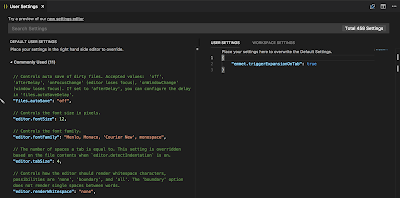
How to enable "Emmet" in visual studio code.

Image
Open command palette by Cmd + Shift + p Enter command user settings User settings file will be opened.  Add this command to in the same file {     "emmet.triggerExpansionOnTab": true } Save and enjoy :) Ref:  https://code.visualstudio.com/docs/editor/emmet User Settings

Setup Jenkins: A continuous integration and continuous deployment toll on Ubuntu 14.04 machine for an Angular4 appication

How to setup jenkins in ubutu 14.04 SRC: https://vexxhost.com/resources/tutorials/how-to-install-configure-and-use-jenkins-on-ubuntu-14-04/ 1) sudo apt-get update 2) Basic Web Server [Only if you want build to be server by a web-server] apt-get install nginx Check service status: service nginx status 3) Java Installation sudo apt-get install openjdk-7-jdk verify the installation: java –version 4) Jenkins Installation and Configuration a) wget -q -O - https://jenkins-ci.org/debian/jenkins-ci.org.key | sudo apt-key add – b) sudo sh -c 'echo deb http://pkg.jenkins-ci.org/debian binary/ > /etc/apt/sources.list.d/jenkins.list' c) sudo apt-get install Jenkins Default user name [jenkin] Jenkins Continuous Integration Server is running with the pid 16997 Port: 8080 If you need to update the configurations of Jenkins as per your requirements, then you can find its configuration file under the `/etc/default/` directory and can make the changes...

Install Genymotion: A simulator tool for react-native applications and other mobile application in Ubuntu 14.04

Install genymotion 1) Download bin file https://www.genymotion.com/fun-zone/ 2) Give it executeable permissions chmod +x genymotion-2.1.0_x64.bin 3) cd genymotion 4) ./genymotion this will run the genymotion but it needs virtual box... 5) Download the virtual box from here... https://www.virtualbox.org/wiki/Linux_Downloads download linux for 64 bits or 32 based on OS sudo dpkg -i /path/to/deb/file followed by sudo apt-get install -f . ISSUES IN GENYMOTION 1) `CXXABI_1.3.8' not found (required by genymotion player issue while starting device SOL: https://stackoverflow.com/questions/37817792/how-to-fix-genymotion-in-linux-elementaryos-with-error-cxxabi-1-3-8-not-found/37817981 Execute the following 5 steps to solve it: LD_LIBRARY_PATH=/usr/local/lib64/:$LD_LIBRARY_PATH export LD_LIBRARY_PATH sudo add-apt-repository ppa:ubuntu-toolchain-r/test sudo apt-get update sudo apt-get install gcc-4.9 g++-4...

Install watchman in Ubuntu 14.04

Install watchman:- SRC: https://facebook.github.io/watchman/docs/install.html Helper links: https://stackoverflow.com/questions/33592197/how-to-install-facebook-watchman-on-ubuntu https://www.howtoinstall.co/en/ubuntu/trusty/inotify-tools Installing from source You can use these steps below to get watchman built. You will need autoconf, automake and libtool (or glibtool on OS X). You may optionally build watchman without pcre and python support (see configuration options below). For python support, you will need setuptools and may need to install a python-dev or python-devel package. To build the C++ client library you will need to install libfolly. See below for some more information on options to configure your build. $ git clone https://github.com/facebook/watchman.git $ cd watchman $ git checkout v4.9.0  # the latest stable release $ ./autogen.sh [Issue1,2] $ ./configure $ make [Issue3] $ sudo make install ISSUE1: your system lacks libtooli...